


Automatic Payment Setup
To setup automatic payments, you must access the Desktop Version of the Portal. This means that you need to do so from a desktop/laptop computer (or you need to tell your mobile browser to load the desktop version of the site. From there you can update/save automatic payment preferences.
- Go to the Customer Portal link on our website – from a desktop/laptop.
- Login to the site. If you don’t yet have a login, create an account by following the link on the page.
- Click your unit number.
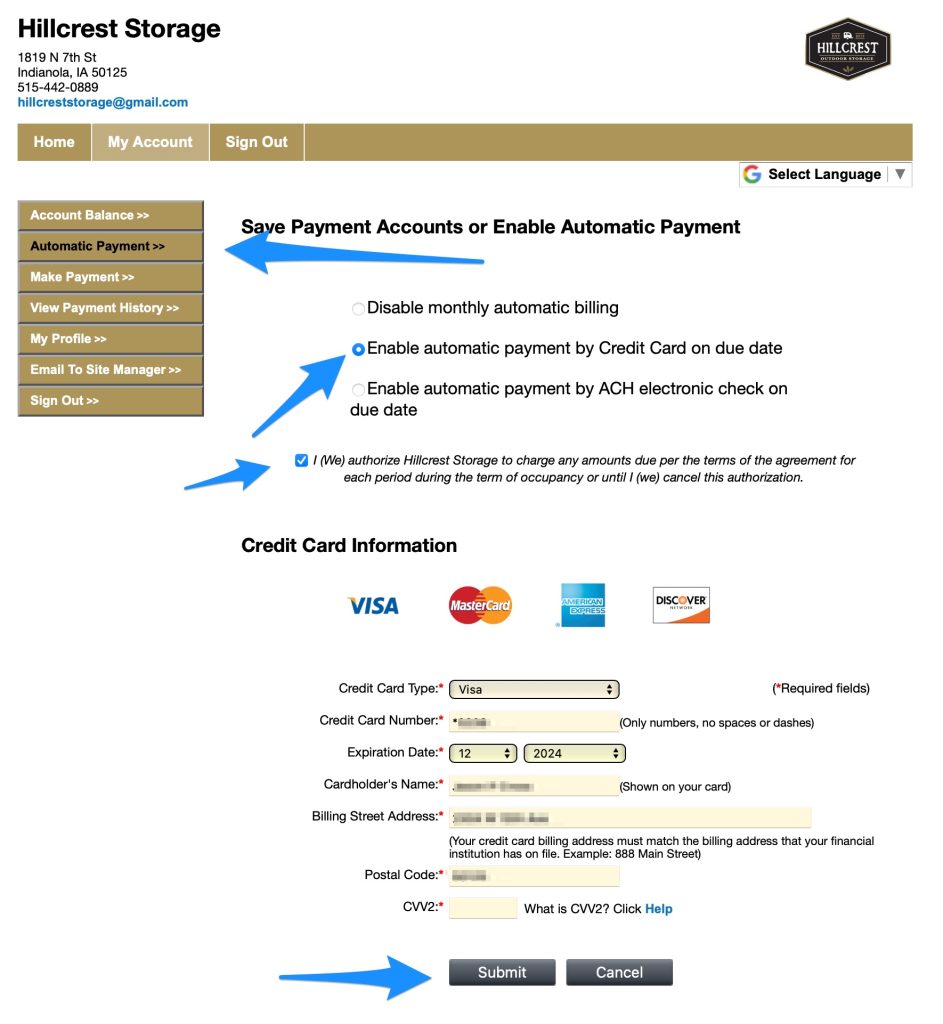
- Click the Automatic Payments menu item on the left.
- Enable automatic payments and check the authorization box.
- Enter your payment info.
- Click Submit.
IMPORTANT NOTE: If accessing the site from mobile or desktop and using the Make Payment link, saving the payment method here does NOT update the automatic payment method. It just saves it for future manual payments from the site. (Why? We have no idea!)